
Most apps get deleted within a week. Not because the idea was bad — because the experience was. Slow load times, confusing navigation, notifications nobody asked for and nobody reads. These are the reasons people abandon apps, and every single one of them is preventable.
If you’re planning a custom mobile app in 2026, the bar is higher than it was two years ago. Attention spans are shorter, expectations are steeper, and the competition for screen time is relentless. The upside: a well-built custom app has every advantage over off-the-shelf alternatives. You’re not inheriting someone else’s compromises. You’re designing exactly what your audience needs.
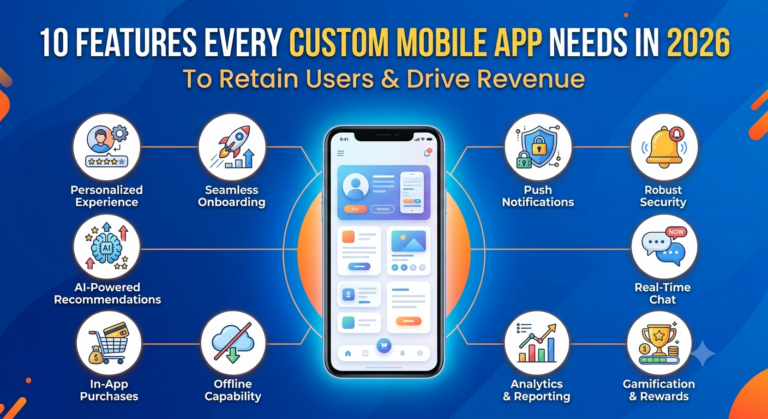
Here are the 10 features that separate apps people keep from apps people delete.
1. Personalized Onboarding
First impressions decide whether someone stays or bounces. A generic welcome screen no longer clears that bar.
Personalized onboarding adapts the setup flow based on what someone tells you about themselves — their role, their goal, their experience level. That’s not about adding five extra questions. It’s about using those answers to surface the right features first and skip the ones that don’t apply.
Apps that personalize onboarding see measurably better activation rates. When someone feels like the app was built for them, they’re far more likely to come back.
2. Push Notifications Done Right
Push notifications are one of the most misused features in mobile. Most apps send too many, target too broadly, and then wonder why opt-out rates keep climbing.
Effective push notifications in 2026 are:
- Triggered by behavior, not a calendar schedule
- Segmented by audience, so the message actually fits the person
- Actionable, meaning one tap takes someone somewhere useful
“You have 3 items in your cart” converts better than “Check out our latest deals.” The difference is specificity. Build your notification logic around what people actually do inside your app — not what you want them to do.
3. Offline Functionality
Connectivity isn’t guaranteed. If your app breaks the moment someone loses signal, you lose their trust.
Offline functionality means your app caches the data people need most and syncs changes when the connection returns. For a field service app, that’s access to job details without WiFi. For a retail app, it’s browsing a product catalog on a plane.
You don’t need every feature to work offline — just the right ones. Figuring out which those are requires thinking through your audience’s actual usage patterns before a single line of code gets written.
4. Biometric Authentication
Passwords are friction. Face ID, fingerprint, device-level passkeys — biometric authentication removes that friction without giving up security.
Every extra step between a person and your app is a reason to close it. Biometric login takes under a second. It also signals that you take security seriously, which builds trust over time.
Make it the default. Don’t bury it in settings as an option most people will never find.
5. In-App Analytics and Behavior Tracking
You can’t improve what you can’t measure. In-app analytics show you exactly where people drop off, which features they actually use, and which screens they leave without doing anything.
This isn’t just a developer tool. As a business owner, this data tells you where to invest next. If 60% of people never reach a key feature, that’s a navigation problem. If your checkout flow has a 40% abandonment rate, that’s a UX problem. Both are fixable — but only if you can see them.
Build analytics in from day one. Retrofitting it later is expensive and usually incomplete.
6. Seamless Payment Integration
If your app involves any kind of transaction, the payment experience will directly affect your revenue. A clunky checkout kills conversions.
Seamless payment integration in 2026 means:
- Support for Apple Pay, Google Pay, and card-on-file
- As few steps as possible between decision and confirmation
- Clear error messaging when something goes wrong
- PCI-compliant handling so your team never touches sensitive card data
For eCommerce apps especially, payment UX isn’t a nice-to-have. It’s one of the highest-leverage places to spend design time.
7. Deep Linking and Smart Navigation
Deep linking lets you send someone directly to a specific screen inside your app — from an email, a push notification, a social post, or another app entirely.
Without it, every external link drops people on your home screen and makes them find their own way. With it, a notification about a pending order takes them straight to that order. A promotional email lands them directly on the product being promoted.
Smart navigation also means your app remembers where someone was when they left. Coming back to a blank home screen after being interrupted is a small frustration — but small frustrations compound.
8. Real-Time Data Sync
If your app connects to any external system — an ERP, a CRM, an inventory database, a booking platform — the data needs to be current. Stale data destroys trust fast.
Real-time sync means a change made in one place reflects everywhere else immediately. A customer checks their order status and sees what’s actually happening, not what was true four hours ago. A field technician updates a job and the office sees it right away.
This is especially critical for mid-market businesses running custom apps alongside existing internal systems. The app has to fit into your data infrastructure — not sit beside it as a disconnected island.
9. Accessibility and Inclusive Design
Accessibility isn’t optional in 2026. Beyond the legal requirements that apply across many industries, accessible design makes your app better for everyone.
That means:
- Sufficient color contrast for readability
- Text that scales with system font size settings
- Tap targets large enough to use comfortably
- Screen reader compatibility for visually impaired users
Inclusive design also tends to improve overall usability. When you design for the edges, the middle benefits too. Tap targets that frustrate someone with motor difficulties also frustrate anyone using their phone one-handed on a commute.
10. Modular Architecture for Fast Updates
This one is invisible to your users but directly affects your ability to grow revenue over time.
A modular architecture means features are built as independent components. When you need to update the payment flow, you update that module without touching the rest of the app. When you want to add a new feature, you add it without rebuilding from scratch.
Apps built as monolithic blocks become expensive to maintain and slow to update. That slowness costs you. Competitors ship faster, and your audience notices when your app starts to feel stale.
When you’re briefing an agency on a custom mobile app build, ask specifically how they structure for future updates. The answer tells you whether they’re building for launch day — or building for the long term.
How These Features Come Together
A feature list is only useful if it’s built with intention. The apps that retain people and drive revenue aren’t the ones with the most features — they’re the ones where every feature serves a clear purpose for a specific audience.
That’s why process matters as much as the feature set itself. At TechYouKnow, every mobile app engagement runs through a three-step framework: Analyze, Implement, Optimize. The Analyze phase is where the right feature set gets defined — based on your audience, your business model, and how people will actually use the app day to day. The Implement phase is where those features get built cleanly and tested. The Optimize phase is where real usage data drives what comes next.
The result is an app built around outcomes, not assumptions.
FAQs
What are the most important custom mobile app features for retaining users?
Personalized onboarding, biometric authentication, and smart navigation have the most direct impact on early retention. They reduce friction in the first few sessions — which is exactly when most people decide whether to keep an app or delete it.
How do I know which features my app actually needs?
Start with your audience’s specific goals and pain points, not a wishlist. The right features depend on what your app is trying to accomplish and how people will use it day to day. A structured analysis phase before development saves significant time and budget down the line.
Does offline functionality add a lot to the development cost?
It adds some complexity, but how much depends on which features need to work offline. Caching read-only content is relatively straightforward. Syncing two-way data changes requires more careful architecture. The right answer comes from understanding your audience’s real usage patterns.
Why does app architecture matter if users never see it?
Because it determines how fast and how cheaply you can improve the app after launch. A poorly structured app becomes expensive to update, which means you ship improvements slowly and fall behind. Modular architecture is an investment in your ability to act on what you learn from real usage.
What is deep linking and why does it matter for revenue?
Deep linking connects external touchpoints — emails, notifications, ads — directly to specific screens inside your app. It removes the friction of making someone navigate to what you want them to see. That friction reduction directly improves conversion rates on campaigns and re-engagement efforts.
Should I build for iOS and Android at the same time?
For most mid-market businesses, yes. Your audience uses both platforms, and launching on one first means half your potential users are waiting. Cross-platform development can reduce the cost of building for both simultaneously without sacrificing quality.
How do in-app analytics connect to revenue?
Analytics show you where people drop off before completing a valuable action — a purchase, a booking, a form submission. Fixing those drop-off points increases the percentage of people who complete that action. More completions, without more traffic, means more revenue.
Building a custom mobile app is a real investment. The features you prioritize at the start determine whether that investment pays off at scale or requires expensive rework six months later.
If you’re ready to define the right feature set for your app and build it with a clear process behind it, book a free consultation with the TechYouKnow team.